Gone Phishing: your guide to this summer’s number one cyber threat
Phishing is the number one cyber attack method. It takes many forms; email, voice, SMS, and the most effective attacks are designed to look completely legitimate.
With staff taking annual leave, inboxes managed by colleagues covering unfamiliar roles and the general distraction that comes with this time of year, cybercriminals know that people are more likely to act without thinking and bite on their infected hooks.
Skeleton teams, out-of-office replies advertising who is away and employees rushing through a list of jobs before heading out on a family break, all creates exactly the kind of conditions that phishing attacks are designed to exploit.
Unlike traditional hacking, which exploits vulnerabilities in software or systems, phishing exploits something far harder to patch; basic human instinct.
It relies on our tendency to trust, to act quickly when we feel under pressure and to take things at face value when they look familiar. Summer simply turns up the pressure on all three.
This guide explains what phishing is, the many forms it takes, how to recognise the warning signs in an email, what to do- and what not to do- when something suspicious arrives, and how to protect your organisation against one of the most sophisticated phishing threats currently targeting businesses: Kali365.
91% of cyber breaches start with a phishing attack
3.4B phishing emails are sent every single day
60s average time before someone clicks a phishing link
What is phishing?
Phishing is a form of social engineering that manipulates people rather than breaking into systems. The term comes from ‘fishing’ in that attackers cast a wide net (or a carefully aimed hook, hoping someone will take the bait. When they do, the consequences can range from a compromised email account to a full business-wide data breach, financial fraud, or ransomware infection.
What makes a phishing attack so effective is that it requires almost no technical knowledge to execute. It can be deployed at scale, and it works regardless of how good your antivirus software is. A cleverly crafted message that tricks an employee into clicking a link or entering their credentials bypasses most technical defences entirely.
Phishing attacks have become progressively more convincing over the years. Early attempts were easy to spot; poor grammar, generic greetings or implausible scenarios. Today, supported by AI, attackers use professional-quality design, stolen branding, personalised details harvested from social media and company websites, and messages that are genuinely difficult to distinguish from legitimate correspondence.
The most important thing to understand about phishing is that it is not a technical system failure, but a human one. That is why awareness and training matter as much as, and in many cases more than, the technology you have in place.
Types of phishing attack
Email Phishing
High-volume campaigns impersonating trusted brands; Microsoft, HMRC, banks, on-line wholesalers. Low personalisation but sent in huge quantities. Most people will encounter this regularly. The aim is to harvest login credentials or install malware via a malicious link or attachment.
Spear Phishing
Targeted, personalised attacks using your name, job title, company, or recent activity. Far more convincing than mass campaigns. Attackers research their targets, using LinkedIn or company websites, to craft messages that are genuinely difficult to distinguish from legitimate correspondence.
Vishing
Voice calls from attackers posing as your bank, HMRC, or even a colleague. The real-time nature of a phone call creates pressure that makes it hard to pause and think. Attackers may already know enough about you to seem credible, such as your name, employer, or a recent transaction.
Smishing
Text messages claiming to be from credible sources containing a malicious link. People are often less guarded with SMS than email, making this an increasingly effective channel. Common hooks include missed parcel deliveries, unpaid fees and bank security alerts.
Whaling
Spear phishing aimed specifically at senior executives or board members. These attacks are highly researched and often impersonate legal advisers, auditors, or financial contacts. The goal is typically large financial transfers, access to sensitive data, or corporate espionage.
Business Email Compromise (BEC)
The attacker either compromises a real email account or spoofs a trusted address; often a supplier or senior colleague, to redirect payments or extract sensitive information. BEC is responsible for billions in losses globally each year and is particularly dangerous because it often involves no malware whatsoever.
Clone Phishing
A legitimate email received previously is copied and re-sent with a malicious link or attachment substituted in. Because the format, sender name, and subject line are all familiar, recipients are far less likely to be suspicious. Often deployed after an attacker has already gained partial access to an account.
QR Code Phishing (Quishing)
Instead of a suspicious hyperlink, the email contains a QR code that directs victims to a malicious site. QR codes bypass many email security filters that scan for malicious URLs and are particularly effective on mobile devices where the full destination URL is not easily visible.
What does a phishing email looks like?
Many attacks combine multiple types of phishing. An attacker might send a spear-phishing email, followed by a vishing call to reinforce the urgency, and then send an SMS with a link. This multi-channel approach is increasingly common and is specifically designed to erode your defences by making the interaction feel more real.
Worryingly, this is becoming harder to determine. The most effective phishing emails succeed precisely because they look legitimate. They use real company logos, replicate genuine email layouts, and are written in confident, professional language from a credible source.
The red flags are there if you know what to look for. But these emails are deliberately crafted to create a sense of urgency that overrides careful thinking — and that rush to act is exactly what attackers are counting on.
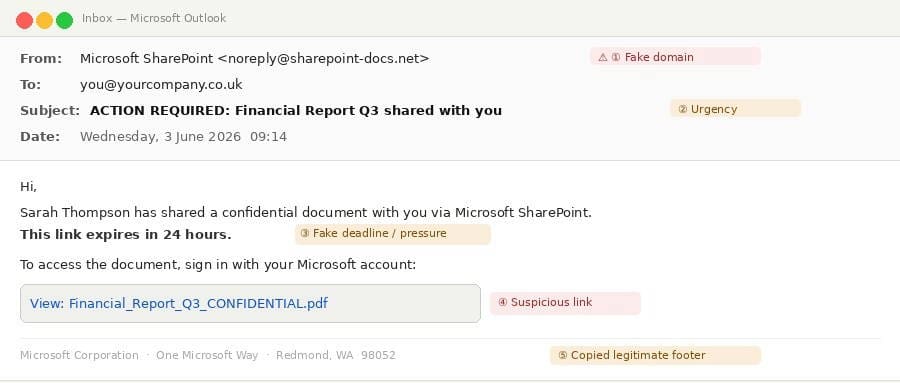
The example below shows a typical phishing email impersonating Microsoft SharePoint. It contains five specific warning signs that appear again and again across phishing attacks, regardless of which brand is being impersonated.
5 warning signs to look for in phishing emails
1. The sender domain is fake: The email claims to be from Microsoft SharePoint, but the actual sending address is noreply@sharepoint-docs.net rather than a genuine microsoft.com address. Attackers register convincing lookalike domains, sometimes only differing by a single character, specifically to pass a quick glance. Always check the full email address, not just the display name.
2. The subject line creates urgency: “ACTION REQUIRED” is a deliberate psychological trigger. When we feel that something is urgent, we act before we think. Phishing emails almost always contain some form of urgency signal, whether that is a warning, a deadline, or language implying that something bad will happen if you do not respond immediately.
3. There is an artificial deadline: “This link expires in 24 hours”, is designed to stop the recipient from pausing to verify the message with the sender. A legitimate file-sharing notification from a colleague does not come with a 24-hour countdown. Any artificial deadline in an email should raise your suspicion immediately.
4. The link destination is suspicious: Always hover over a link before you click it. The text that appears on screen can say anything, but the actual URL it points to tells the real story. If the destination URL does not match the legitimate domain of the organisation supposedly contacting you, do not click it.
5. The footer is copied, not genuine: Logos, footers, and official-looking formatting are very easy to copy and paste. Their presence in an email proves absolutely nothing about who sent it. Attackers include them specifically because they make recipients feel more confident. Never interpret a familiar logo as confirmation that an email is real.
The golden rule to avoid a phishing attack
Before clicking any link, opening any attachment, or entering any credentials prompted by an email, first ask yourself: did I expect this message?
If the answer is no, even if it looks completely genuine, pause and verify through a separate channel before doing anything. Call the supposed sender on a number you already have for them, not one provided in the email.
What to do and what not to do if you suspect a phishing attack
DO
DON’T
Pause before acting on any unexpected message, even if it looks completely legitimate
Verify with the sender using a separate, trusted channel
Hover over any link before clicking to check the real destination URL
Report any suspicious messages promptly even if you are not sure
Check sender email addresses carefully, including the full domain after the @ symbol
Update passwords immediately if you think you may have been caught by a phishing attempt
Click links or open attachments in unexpected emails, even from people you know
Enter a device code, password, or MFA code prompted by a message you did not initiate yourself
Reply to or call back on contact details provided within a suspicious message
Assume a message is safe because it arrived by SMS or phone rather than email
Let urgency or pressure override your judgement
Assume a familiar logo or professional formatting means an email is genuine
Forward suspicious emails to colleagues. If it is malicious, you may spread the attack
Reporting suspicious activity is a simple way to avoid being caught by or passing on a phishing attack, but many people hesitate to flag messages they are unsure of in case they are wrong. This is one of the most damaging behaviours in any organisation. It is better to raise ten false alarms than miss one real attack.
Spotlight: The Kali365 threat
Kali365 is a sophisticated phishing campaign currently targeting Microsoft 365 users. It operates differently from the vast majority of phishing attacks. Most phishing aims to steal your password. Kali365 does not need your password at all.
Instead, it abuses a genuine Microsoft feature called device code authentication to gain persistent access to your email, files, and data. Because it uses a real Microsoft mechanism, it bypasses multi-factor authentication entirely. Your authenticator app cannot protect you if the attacker never asks for your password in the first place.
How Kali365 works
The attack unfolds in four steps:
Step 1: You receive a convincing email that appears to come from a familiar service; most commonly SharePoint, DocuSign, or Adobe. The email looks professional and may reference a specific document or file that seems plausible given your role.
Step 2: The email provides a device code, a short alphanumeric string, and directs you to a real Microsoft website (microsoft.com/devicelogin) to enter it. Because the URL is a genuine Microsoft page, it passes browser security checks and looks entirely legitimate.
Step 3: The moment you enter the code you have authenticated the attacker’s session. Microsoft’s device code flow was designed for setting up new devices like TVs, smart speakers, or work phones, where typing a password is impractical. Kali365 exploits this mechanism by generating its own code and tricking you into entering it on its behalf.
Step 4: The attacker now has full, ongoing access to your Microsoft 365 account, including your emails, your files, your contacts, your calendar, all without ever knowing your password or needing your MFA code. They can read and exfiltrate data silently, send emails from your account, access shared drives, and maintain access until their token expires or is revoked.
Why KALI365 is particularly dangerous
Most phishing defences focus on preventing credential theft. Kali365 sidesteps this entirely.
Because it uses a genuine Microsoft URL, it is extremely difficult for email security tools to flag as malicious. And, because it doesn’t require your password or MFA code, the conventional advice of ‘use a strong password and enable two-factor authentication’ offers no protection here.
The only defence is awareness; knowing that device codes exist, knowing what they are for, and refusing to enter one unless you initiated the device setup process yourself.
How to protect your business
Three simple rules will protect your business from Kali365.
Never enter a device code to open or view a file. This is not how Microsoft 365 works. You should only ever enter a device code if you personally initiated a device setup and you are actively completing that process at the time.
Treat any unexpected request involving a device code as a red flag, regardless of how official the email looks. The email can be beautifully formatted, appear to come from a trusted colleague, and link to a genuine Microsoft page and still be a Kali365 attack.
Verify unexpected file-sharing notifications before doing anything. If a notification about a shared document arrives unexpectedly, contact the supposed sender directly through a channel you already trust; a phone call, a separate email, a Teams message, before clicking or entering anything.
There are tools and mechanisms available to your managed IT provider that can be used to help to block these types of attack. This strategy removes an unnecessary and high-risk sign-in route, and helps to protect your organisation from modern phishing attacks.
How to avoid a phishing attack
Technology alone cannot stop phishing. A multi-layered approach that combines technical measures, with regular user education means you’ll have multiple opportunities to detect a phishing attack and then stop it before it causes harm. The organisations that are most resilient to phishing are those where every member of the team understands the threat, knows what to look for, and feels confident about acting on their suspicions.
Building that culture is not a one-off exercise. Threats evolve continuously, and training delivered once and never revisited quickly loses its value. Regular, brief, practical sessions-covering real-world examples and current attack techniques- are far more effective than annual compliance tick-boxes.
Summary
Phishing is the most common way cyber-attackers gain access to business systems and data. It takes many forms; email, voice, SMS, and more and the most effective attacks are designed to look completely legitimate.
The best defence combines technical measures with genuine human awareness. A team that knows what to look for, pauses before acting, and reports anything suspicious is far harder to compromise than one that relies on technology alone.
If you would like to discuss your organisation’s cyber security posture, review your current defences, or arrange a security awareness session for your team, please get in touch.
Managed IT support, including cloud migration and Microsoft 365 expertise, backed by a cybersecurity framework built for today's threats can keep your systems running, your team productive, and your business…
The Cyber Security threat landscape has changed. Attacks aren't just more frequent, they're fundamentally more complex. AI, identity theft, and human manipulation are converging into threats that are harder to…
For many business owners and directors in Gloucestershire, cyber-crime still feels like something that happens to “other companies.” Large corporates; retail giants and global manufacturers maybe, but not small, local independents. But the reality in 2026 is very different. On a…